HTTP/2 & HTTP/3: Multiplexing and QUIC
HTTP/2 processes multiple requests simultaneously over a single connection through multiplexing, improving page load performance by 2–3× compared to HTTP/1.1. HTTP/3 uses the UDP-based QUIC protocol to maintain performance even in high packet-loss environments.
HTTP/1.1 vs HTTP/2 vs HTTP/3
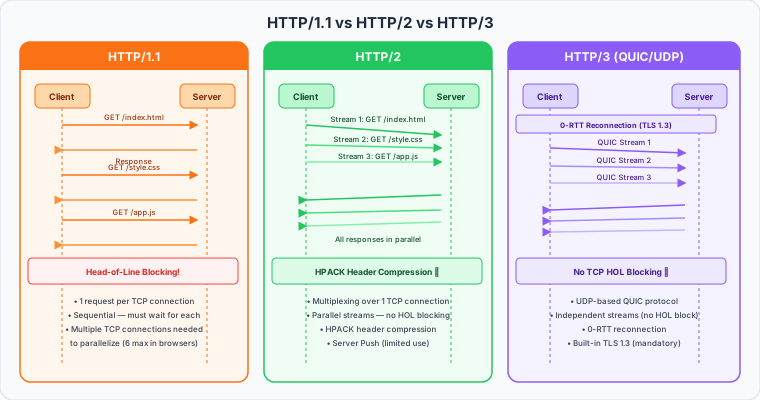
| Item | HTTP/1.1 | HTTP/2 | HTTP/3 |
|---|---|---|---|
| Transport | TCP | TCP | UDP (QUIC) |
| Multiplexing | ❌ (HOL blocking) | ✅ (single TCP stream) | ✅ (independent QUIC streams) |
| Header compression | ❌ | ✅ (HPACK) | ✅ (QPACK) |
| Server Push | ❌ | ✅ (limited practical use) | ❌ (removed) |
| TLS required | ❌ | De facto mandatory | ✅ Required |
| 0-RTT connection | ❌ | ❌ | ✅ |
Enabling HTTP/2 in Nginx
# Nginx 1.25.1+: use the http2 on directive
server {
    listen 443 ssl;
    listen [::]:443 ssl;
    http2 on;            # Enable HTTP/2
    server_name example.com;

    ssl_certificate     /etc/letsencrypt/live/example.com/fullchain.pem;
    ssl_certificate_key /etc/letsencrypt/live/example.com/privkey.pem;
    ssl_protocols TLSv1.2 TLSv1.3;

    location / {
        proxy_pass http://backend;
        proxy_http_version 1.1;       # use HTTP/1.1 to the backend (typical)
        proxy_set_header Connection "";
        proxy_set_header Host $host;
    }
}

# Older Nginx (< 1.25.1): append http2 to the listen line
server {
    listen 443 ssl http2;
    listen [::]:443 ssl http2;
    # ...
}
# Verify HTTP/2 is active
curl -I --http2 https://example.com | grep "HTTP/"
# HTTP/2 200

# Or check the negotiated protocol
openssl s_client -connect example.com:443 -alpn h2 2>/dev/null | grep "ALPN"
# ALPN protocol: h2  ← HTTP/2 negotiated
HTTP/2 Performance Tuning
http {
    # Maximum concurrent streams per connection (default: 128)
    http2_max_concurrent_streams 256;

    # Idle connection timeout
    keepalive_timeout 65;
    keepalive_requests 1000;
}
Enabling HTTP/2 in Apache (mod_http2)
# Ubuntu
sudo a2enmod http2
sudo systemctl restart apache2

# Verify
apache2ctl -M | grep http2
# http2_module (shared)
# /etc/apache2/conf-available/http2.conf

# Configure globally or per VirtualHost
Protocols h2 h2c http/1.1
# h2   : HTTP/2 over TLS
# h2c  : HTTP/2 cleartext (browsers don't use this)
# http/1.1 : fallback

# HTTP/2 requires MPM Event (not Prefork)
# sudo a2dismod mpm_prefork
# sudo a2enmod mpm_event
<VirtualHost *:443>
    ServerName example.com

    SSLEngine On
    SSLCertificateFile    /etc/ssl/example.com/fullchain.pem
    SSLCertificateKeyFile /etc/ssl/example.com/privkey.pem

    Protocols h2 http/1.1
</VirtualHost>
HTTP/3 (QUIC) Configuration
HTTP/3 is experimentally supported from Nginx 1.25.x+. It requires BoringSSL or quictls instead of OpenSSL.
# Check if HTTP/3 module is built in
nginx -V 2>&1 | grep "with-http_v3_module"
server {
    # HTTP/3 listener (UDP port 443)
    listen 443 quic reuseport;
    listen 443 ssl;
    listen [::]:443 quic reuseport;
    listen [::]:443 ssl;
    http2 on;

    server_name example.com;

    ssl_certificate     /etc/ssl/fullchain.pem;
    ssl_certificate_key /etc/ssl/privkey.pem;
    ssl_protocols TLSv1.3;  # HTTP/3 requires TLS 1.3

    # Alt-Svc header: tells browser HTTP/3 is available
    add_header Alt-Svc 'h3=":443"; ma=86400';

    location / {
        proxy_pass http://backend;
    }
}
# Verify HTTP/3 is working
curl -I --http3 https://example.com | grep "HTTP/"
# HTTP/3 200
Client-to-Backend Protocol Strategy
upstream backend {
    server app1:8080;
    server app2:8080;
    keepalive 64;
}

server {
    listen 443 ssl;
    http2 on;

    # Standard HTTP backend
    location /api/ {
        proxy_pass http://backend;
        proxy_http_version 1.1;
        proxy_set_header Connection "";
    }

    # gRPC backend (HTTP/2)
    location /grpc/ {
        grpc_pass grpc://grpc_backend:50051;
    }
}
HTTP/2 Server Push
HTTP/2 allows the server to proactively send resources without a request. However, its practical value is limited and it was removed in HTTP/3.
location = /index.html {
    proxy_pass http://backend;

    # Push CSS and JS when HTML is requested (HTTP/2 only)
    http2_push /static/app.css;
    http2_push /static/app.js;
}

# Or use Link header for dynamic push
location / {
    proxy_pass http://backend;
    http2_push_preload on;
    # Backend returns: Link: </static/app.css>; rel=preload; as=style
}
Practical alternative:<link rel="preload"> hints in HTML are more reliable.
Measuring HTTP/2 Performance
# HTTP/1.1 baseline
ab -n 1000 -c 50 https://example.com/

# HTTP/2 benchmark (h2load)
h2load -n 1000 -c 50 -m 10 https://example.com/
# -m 10 : max 10 concurrent streams per connection

# Install h2load
sudo apt install nghttp2-client

# Typical result comparison:
# HTTP/1.1: ~200 req/s
# HTTP/2:   ~800 req/s (multiplexing effect)